hai-ip vpn 연결없이는 잘되는데 연결하면 아래 에러 발생
플랫폼 버전 정보
	Windows 			: 10.0.26100.0 (Win32NT)
	Common Language Runtime 	: 4.0.30319.42000
	System.Deployment.dll 		: 4.8.9181.0 built by: NET481REL1LAST_C
	clr.dll 			: 4.8.9300.0 built by: NET481REL1LAST_C
	dfdll.dll 			: 4.8.9181.0 built by: NET481REL1LAST_C
	dfshim.dll 			: 10.0.26100.1882 (WinBuild.160101.0800)

원본
	배포 url			: https://사용자Url.application

오류 요약
	다음은 오류에 대한 요약입니다. 이러한 오류의 세부 정보는 나중에 로그에 기록됩니다.
	* https://사용자Url.application 활성화로 예외가 발생했습니다. 다음 실패 메시지가 발견되었습니다.
		+ https://사용자Url.application에서 매니페스트를 읽는 동안 예외가 발생했습니다. 매니페스트가 잘못되었거나 파일을 열 수 없습니다.
		+ EntityName을 구문 분석하는 동안 오류가 발생했습니다. 줄 1, 위치 570

구성 요소 저장소 트랜잭션 실패 요약
	트랜잭션 오류가 발생하지 않았습니다.

경고
	이 작업을 수행하는 동안 경고가 발생하지 않았습니다.

작업 진행 상태
	* [2025-06-19 오후 7:59:37]: https://사용자Url.application 활성화가 시작되었습니다.

오류 정보
	이 작업을 수행하는 동안 다음 오류가 발생했습니다.
	* [2025-06-19 오후 7:59:37] System.Deployment.Application.InvalidDeploymentException(ManifestParse)
		- https://사용자Url.application에서 매니페스트를 읽는 동안 예외가 발생했습니다. 매니페스트가 잘못되었거나 파일을 열 수 없습니다.
		- 원본: System.Deployment
		- 스택 추적:
			위치: System.Deployment.Application.ManifestReader.FromDocument(String localPath, ManifestType manifestType, Uri sourceUri)
			위치: System.Deployment.Application.DownloadManager.DownloadDeploymentManifestDirectBypass(SubscriptionStore subStore, Uri& sourceUri, TempFile& tempFile, SubscriptionState& subState, IDownloadNotification notification, DownloadOptions options, ServerInformation& serverInformation)
			위치: System.Deployment.Application.DownloadManager.DownloadDeploymentManifestBypass(SubscriptionStore subStore, Uri& sourceUri, TempFile& tempFile, SubscriptionState& subState, IDownloadNotification notification, DownloadOptions options)
			위치: System.Deployment.Application.ApplicationActivator.PerformDeploymentActivation(Uri activationUri, Boolean isShortcut, String textualSubId, String deploymentProviderUrlFromExtension, BrowserSettings browserSettings, String& errorPageUrl, Uri& deploymentUri)
			위치: System.Deployment.Application.ApplicationActivator.PerformDeploymentActivationWithRetry(Uri activationUri, Boolean isShortcut, String textualSubId, String deploymentProviderUrlFromExtension, BrowserSettings browserSettings, String& errorPageUrl)
--- 예외가 throw된 이전 위치의 스택 추적 끝 ---
			위치: System.Runtime.ExceptionServices.ExceptionDispatchInfo.Throw()
			위치: System.Deployment.Application.ApplicationActivator.PerformDeploymentActivationWithRetry(Uri activationUri, Boolean isShortcut, String textualSubId, String deploymentProviderUrlFromExtension, BrowserSettings browserSettings, String& errorPageUrl)
			위치: System.Deployment.Application.ApplicationActivator.ActivateDeploymentWorker(Object state)
		--- 내부 예외 ---
		System.Xml.XmlException
		- EntityName을 구문 분석하는 동안 오류가 발생했습니다. 줄 1, 위치 570
		- 원본: System.Xml
		- 스택 추적:
			위치: System.Xml.XmlTextReaderImpl.Throw(Exception e)
			위치: System.Xml.XmlTextReaderImpl.ParseEntityName()
			위치: System.Xml.XmlTextReaderImpl.ParseEntityReference()
			위치: System.Xml.XmlTextReaderImpl.ParseText()
			위치: System.Xml.XmlTextReaderImpl.ParseElementContent()
			위치: System.Deployment.Application.ManifestValidatingReader.XmlFilteredReader.Read()
			위치: System.Xml.XmlTextReaderImpl.Skip()
			위치: System.Deployment.Application.ManifestValidatingReader.XmlFilteredReader.Read()
			위치: System.Deployment.Application.ManifestValidatingReader.XmlFilteredReader.Read()
			위치: System.Xml.XmlTextReaderImpl.Skip()
			위치: System.Deployment.Application.ManifestValidatingReader.XmlFilteredReader.Read()
			위치: System.Deployment.Application.ManifestValidatingReader.XmlFilteredReader.Read()
			위치: System.Xml.XmlTextReaderImpl.Skip()
			위치: System.Deployment.Application.ManifestValidatingReader.XmlFilteredReader.Read()
			위치: System.Xml.XsdValidatingReader.Read()
			위치: System.Deployment.Application.ManifestReader.FromDocument(String localPath, ManifestType manifestType, Uri sourceUri)

구성 요소 저장소 트랜잭션 정보
	트랜잭션 정보를 사용할 수 없습니다.
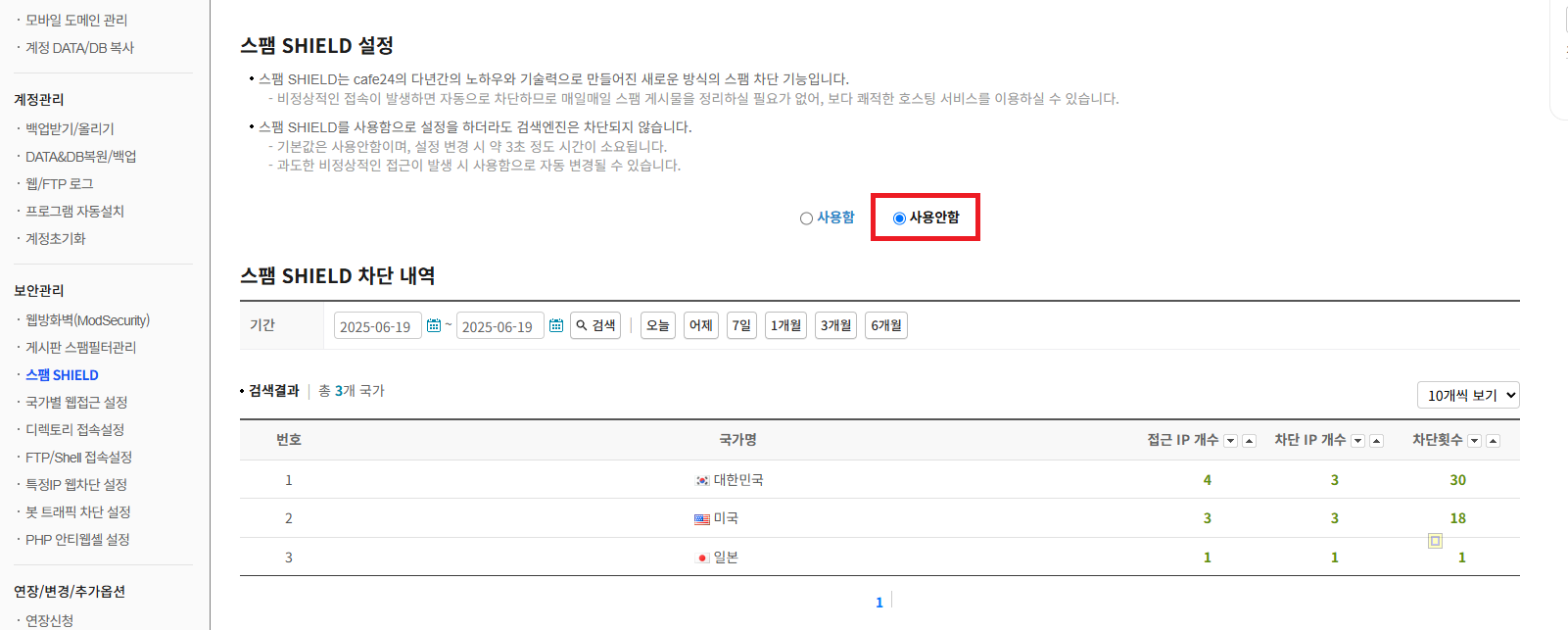
해결방법은 cafe24가 특정 ip에 대해 blocking 하는 현상때문에 발생.
스팸 SHIELD에서 사용안함으로 셋팅하면 해결.
반응형